
Choosing the right overclocking RAM can make a significant difference in your DIY PC's performance, but speed isn't the only factor that matters. From memory capacity and platform compatibility to cooling and long-term stability, every detail plays a role in building a reliable system. This guide explains how to choose the right DDR5 memory and highlights the key features to look for before upgrading your PC.
RAM plays a crucial role in your PC's overall responsiveness. It temporarily stores the data your CPU needs, allowing applications and games to run smoothly. Choosing the right memory helps create a balanced system where the CPU, GPU, and RAM work together efficiently.
For users seeking extra performance, overclocking RAM can further improve memory bandwidth and responsiveness when supported by compatible hardware.
RAM acts as your computer's temporary workspace, allowing the CPU to quickly access active data without relying on slower storage devices. Faster and sufficient memory helps your entire system run more efficiently.
Benefits of faster DDR5 memory include:
While RAM alone doesn't determine overall speed, it helps reduce memory bottlenecks so other components can perform at their full potential.
Not every PC needs high-speed memory. Standard DDR5 is sufficient for everyday tasks such as web browsing, office work, and media streaming. However, overclocking RAM offers noticeable benefits for more demanding workloads.
Users who benefit the most include:
The best choice is not always the fastest RAM available, but memory that delivers the right balance of speed, compatibility, stability, and long-term reliability.
 |
|
Choosing the right overclocking RAM involves more than selecting the highest speed available. To achieve stable performance, your memory should match your CPU, motherboard, and intended workload. A balanced combination of speed, capacity, and compatibility will deliver better real-world results than focusing on a single specification.
RAM speed is measured in MT/s (Mega Transfers per Second), which indicates how much data the memory can transfer each second. In general, higher MT/s provides greater memory bandwidth, but the best choice depends on your hardware and how you use your PC.
Recommended DDR5 Speed Ranges:
Memory capacity is equally important.
Recommended RAM Capacities:
Understanding CAS Latency (Timings) RAM speed isn't just about bandwidth (MT/s); it’s also about response time, which is measured by CAS Latency (CL). For instance, a 6000 MT/s kit with a lower latency (e.g., CL30) will perform noticeably better and feel more responsive than a kit with a higher latency (e.g., CL40). Always aim for the lowest CL number your budget allows at your target speed.
Rather than simply choosing the highest speed or largest capacity, select a combination that fits your workload and system for the best balance of performance, stability, and value.
Before buying overclocking RAM, make sure it is compatible with both your CPU and motherboard. Even the fastest DDR5 memory cannot reach its advertised speed if your platform doesn't support it.
Two key factors to check are:
Choosing memory that matches your platform allows you to enjoy better stability, easier overclocking, and the performance your DDR5 RAM is designed to deliver.
While speed is important, choosing the right overclocking RAM also means considering features that affect stability, reliability, and compatibility.
Cooling and Heat Dissipation
High-speed DDR5 memory generates more heat, especially when running at overclocked settings. An efficient heat spreader helps dissipate heat, maintaining stable performance during long gaming sessions or demanding workloads.
PMIC (Power Management IC)
DDR5 features a built-in Power Management IC (PMIC) that regulates power directly on the memory module. This improves voltage stability, helping the RAM operate more reliably, particularly at higher speeds.
Build Quality
A well-designed PCB, durable components, and a high-quality heat spreader all contribute to better signal integrity, thermal performance, and long-term reliability.
Physical Clearance
Don't overlook RAM height, especially if you're using a large air cooler or building a compact PC. Low-profile memory modules offer wider compatibility and make installation easier.
Ultimately, selecting overclocking RAM isn't just about achieving the highest MT/s. It should also provide dependable performance, effective cooling, and compatibility for long-term use.
Building a high-performance PC requires more than simply choosing the fastest DDR5 kit available. Reliable overclocking RAM should deliver a balance of speed, stability, cooling, and compatibility to ensure consistent performance under demanding workloads.
High-quality overclocking RAM is designed with features that help maintain both performance and long-term system stability.
Key features to look for include:
Together, these features help maximize performance while reducing the risk of instability, making them essential for DIY builders who want a fast, dependable DDR5 system.
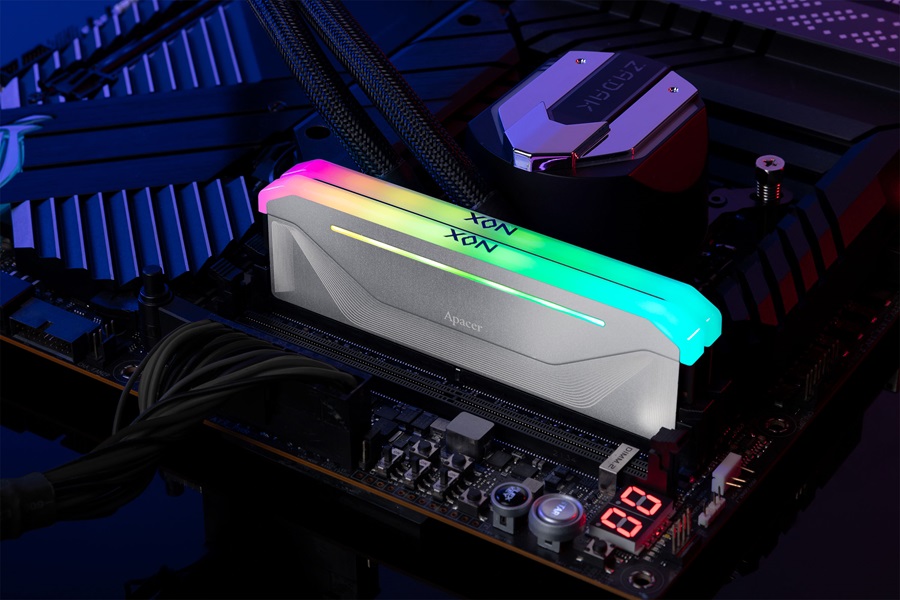
A good example of overclocking RAM designed for modern DIY PC builds is the Apacer NOX RGB DDR5. Combining high-speed performance, efficient cooling, and user-friendly overclocking features, it is built to meet the demands of gamers, creators, and PC enthusiasts seeking both power and long-term stability.
 |
|
Key features include:
By combining high frequencies, efficient thermal management, stable power delivery, and broad platform compatibility, the Apacer NOX RGB DDR5 demonstrates the key characteristics that users should look for when choosing reliable overclocking RAM for ambitious DIY PC builds.
Choosing the right overclocking RAM isn't just about buying the fastest DDR5 kit available. Avoiding a few common mistakes can help you achieve better performance, improved stability, and a smoother upgrade experience.
One of the biggest misconceptions is that higher MT/s always means better performance. While faster memory provides greater bandwidth, the real-world benefits depend on whether the rest of your system can take advantage of it.
For example, installing an 8000 MT/s kit on a platform that officially supports lower speeds may result in the memory running below its rated specification. Likewise, pairing premium DDR5 memory with an entry-level CPU or GPU will leave your system bottlenecked elsewhere, preventing you from seeing any real-world benefits from your high-speed RAM.
Even high-quality overclocking RAM cannot perform at its best if it isn't compatible with your system. Before purchasing, verify that your CPU and motherboard support the desired memory speed, and ensure the RAM's physical height fits your CPU cooler and case.
Cooling is equally important. High-speed DDR5 memory generates more heat during intensive workloads and overclocking. A quality heat spreader helps dissipate heat efficiently, allowing the memory to maintain stable performance over long gaming sessions or demanding applications.
Many builders focus only on their current needs and forget to plan for future expansion. As software and games become more demanding, additional memory capacity may be needed to maintain smooth performance.
When choosing DDR5 memory, consider both your current workload and future upgrade plans. However, be aware of a crucial DDR5 hardware quirk: modern memory controllers currently struggle to maintain high overclocked speeds when running four memory modules simultaneously.
If you need a large amount of memory, it is highly recommended to buy two higher-capacity sticks (e.g., 2x32GB) rather than four smaller ones (e.g., 4x16GB) to ensure maximum stability and overclocking potential. A little planning today can make your DIY PC more flexible and future-ready.
Building a high-performance PC isn't about choosing the most expensive components. It's about creating a balanced system. The right combination of CPU, motherboard, and overclocking RAM helps maximize performance while ensuring long-term stability and upgrade flexibility.
The best DDR5 system is one where every component complements the others. Pairing premium overclocking RAM with an entry-level CPU or motherboard may limit its potential, while a powerful processor can also be held back by slow or insufficient memory.
When selecting your components, aim for a balanced configuration by considering:
A well-balanced build delivers better real-world performance than overspending on a single component.
After installing new DDR5 memory, don't expect it to run at its advertised speed immediately. By default, most DDR5 modules operate at standard JEDEC settings to ensure maximum compatibility.
To unlock the rated memory speed, simply enable the appropriate overclocking profile in your motherboard's BIOS:
With just one setting, your memory can operate at its optimized speed without requiring manual tuning.
After enabling an overclocking profile, it's good practice to verify system stability before using your PC for gaming or professional workloads. Running a memory stress test helps confirm that your system remains stable under load and can identify potential issues before they affect everyday use.
Ultimately, the best overclocking RAM isn't simply the fastest kit on the market. It's the one that offers the right balance of performance, compatibility, efficient cooling, and long-term reliability, ensuring your DIY PC performs consistently today and remains ready for future upgrades.
If you're looking for high-performance DDR5 memory designed for ambitious DIY builds, explore Apacer's DDR5 memory lineup, including the NOX RGB DDR5, to find the right solution for your next PC upgrade.