
Modern gaming SSDs deliver fast data transfer and responsive performance, but sustained workloads can also generate heat around the controller and NAND components. Without effective thermal management, heat can build up and eventually affect performance.
A heat spreader provides a compact way to distribute heat across a larger area. This guide explains how heat spreaders work, how they differ from heatsinks, and why thermal design matters for gaming SSDs.
A heat spreader is a thermally conductive component that distributes heat from a concentrated source across a larger surface.
Electronic components such as processors, memory chips, and SSD controllers generate heat within relatively small areas. When that heat remains concentrated at its source, the local temperature can rise quickly even if the rest of the device remains comparatively cool.
A heat spreader reduces this concentration by creating a wider path for thermal energy. Instead of letting heat stay around one controller or semiconductor package, it spreads that energy across its surface or transfers it to another cooling component.
Heat spreaders can be made from materials with high thermal conductivity, including:
The purpose of a heat spreader is primarily heat distribution, not necessarily complete heat removal. Depending on the system design, the spreader may release some heat directly into the surrounding air or pass it to another cooling element, such as a heatsink, metal chassis, vapor chamber, or cooling plate.
This distinction is important. A heat spreader prevents a small component from becoming a severe hotspot by making more surface area available for subsequent cooling. Fraunhofer IZM describes heat spreaders as materials or substrates used in microelectronics to distribute heat over a larger area and minimize thermal resistance.
In a gaming SSD, the heat spreader is generally a thin layer placed over the controller and NAND packages. Its low-profile construction allows it to improve thermal distribution without substantially increasing the SSD’s physical height.
A heat spreader works through thermal conduction. Heat naturally moves from a higher-temperature area toward a lower-temperature area when a conductive path is available.
The process can be divided into four stages.
During operation, an electronic component converts part of the electrical energy it consumes into heat. In an SSD, the controller usually generates a substantial portion of this heat while managing read and write commands, error correction, NAND access and data movement.
A heat spreader is positioned close to the heat-generating component. A thermal interface layer may be placed between them to fill microscopic gaps and improve physical contact.
Without proper contact, tiny air pockets can remain between the surfaces. Because air has relatively low thermal conductivity, these gaps increase resistance and make heat transfer less efficient.
Once thermal energy enters the spreader, the material conducts it away from the concentrated hotspot. The heat spreads laterally across the plate, film or layered structure.
This wider distribution lowers the temperature difference between the hottest section and the surrounding portions of the component. It also allows a larger surface to participate in the cooling process.
The distributed heat is then transferred to:
The effectiveness of this process depends on more than the spreader material. Contact quality, thickness, surface area, mounting pressure, airflow and ambient temperature all influence the final result. Thermal interface materials are particularly important because voids or uneven contact can increase system-level thermal resistance.
Some heat spreaders use solid materials, while others rely on phase-change mechanisms.
A solid spreader conducts heat directly through copper, aluminum, graphite or another conductive material. A vapor chamber or heat pipe contains a working fluid that absorbs heat, evaporates, moves toward a cooler region and condenses before returning to the heat source.
For a slim M.2 gaming SSD, a solid graphite- or graphene-based design is often practical because it can spread heat without adding the height associated with a large finned cooler.
Heat spreaders and heatsinks both support thermal management, but they perform different primary functions.
A heat spreader distributes heat across a wider area. A heatsink is designed to release heat from that wider area into the surrounding environment.
|
|||||||||||||||||||||||||||
A heatsink uses fins or pins to increase the amount of surface area exposed to air. Natural convection or fan-driven airflow then carries thermal energy away from the metal.
This design can provide strong heat dissipation, but it also requires physical clearance. A tall heatsink may interfere with a graphics card, motherboard cover, laptop chassis, or nearby expansion component.
A heat spreader has a flatter profile. It does not create the same air channels as a finned heatsink, but it can move heat away from concentrated hotspots and make the existing cooling system more effective.
The two solutions are not mutually exclusive. A heat spreader may distribute heat from the component into a motherboard heatsink, while the heatsink releases that heat into the case airflow.
The appropriate solution depends on the application:
In practical terms, a heat spreader solves a heat concentration problem, while a heatsink primarily solves a heat dissipation problem.
The material used in a heat spreader determines how efficiently it conducts heat, how much weight it adds and how easily it can fit within the device.
Copper has high thermal conductivity and distributes heat efficiently. It is widely used in cooling plates, processor heat spreaders, heat pipes, and high-performance electronic assemblies.
Its key advantages include:
However, copper is relatively heavy and generally more expensive than aluminum. A thick copper plate may be impractical for an ultrathin laptop or lightweight portable device.
Copper is therefore often used where cooling performance is more important than weight or where only a small amount of material is required.
Aluminum provides a useful balance of thermal conductivity, weight, cost and ease of manufacturing.
It is commonly used for:
Although aluminum does not conduct heat as efficiently as copper, it is considerably lighter. It can also be stamped, machined, or extruded into many different shapes at a relatively low cost.
For general-purpose electronics, aluminum is often sufficient when the component has moderate thermal requirements and access to reasonable airflow.
Graphite is lightweight and can provide very high in-plane thermal conductivity. This means it is particularly effective at moving heat laterally across a thin surface.
Graphite heat spreaders are well suited to:
Unlike a thick metal plate, a graphite layer can be made extremely thin and flexible. This allows it to follow the surface of a device while adding minimal height and weight.
However, untreated graphite can be brittle or flaky. It may require an encapsulating layer to improve durability and prevent graphite particles from entering nearby electronic components. Encapsulated graphite structures combine the conductivity of graphite with a protective mechanical envelope.
Graphene-based heat spreaders are designed to deliver efficient lateral heat distribution within a very thin profile.
Their characteristics make them relevant for compact electronics:
For an M.2 SSD, the primary advantage is not simply the conductivity of the material. It is the ability to provide meaningful thermal control without creating the physical clearance issues associated with a large metal heatsink.
The final effectiveness depends on the complete structure, including the number of layers, encapsulation, contact area, and connection to the surrounding cooling environment.
For gaming SSDs, these characteristics make graphene-based heat spreaders particularly suitable for compact designs where thermal management and physical clearance are both important.
Heat spreaders are used wherever a compact or high-density component produces more concentrated heat than its surrounding structure can manage effectively.
Processors generate substantial heat within a small semiconductor die. Many CPUs include an integrated heat spreader between the silicon die and the external cooling system.
This metal cover distributes heat across a larger surface, allowing the CPU cooler to make more effective contact. The heatsink and fan then remove that heat from the processor assembly.
Graphics processors use similar thermal structures beneath their main cooling solutions.
Performance memory modules may use aluminum or copper heat spreaders around the memory chips.
These covers distribute heat across the module and provide a larger surface for passive cooling. In systems with active case airflow, air moving across the memory can then carry the distributed heat away.
Mobile devices have very limited internal space and cannot usually accommodate conventional finned heatsinks.
Manufacturers may use graphite sheets, vapor chambers or metal chassis components to distribute heat from processors, batteries and power-management circuits.
The heat is spread across a larger portion of the device before being transferred through the housing into the surrounding environment.
Thin laptops contain processors, SSDs, memory and batteries within tightly packed enclosures. Heat spreaders can connect these components to heat pipes, cooling plates, fans or the device chassis.
Low-profile thermal solutions are particularly important in gaming laptops, where high-performance components operate in a much smaller space than a desktop PC.
 |
|
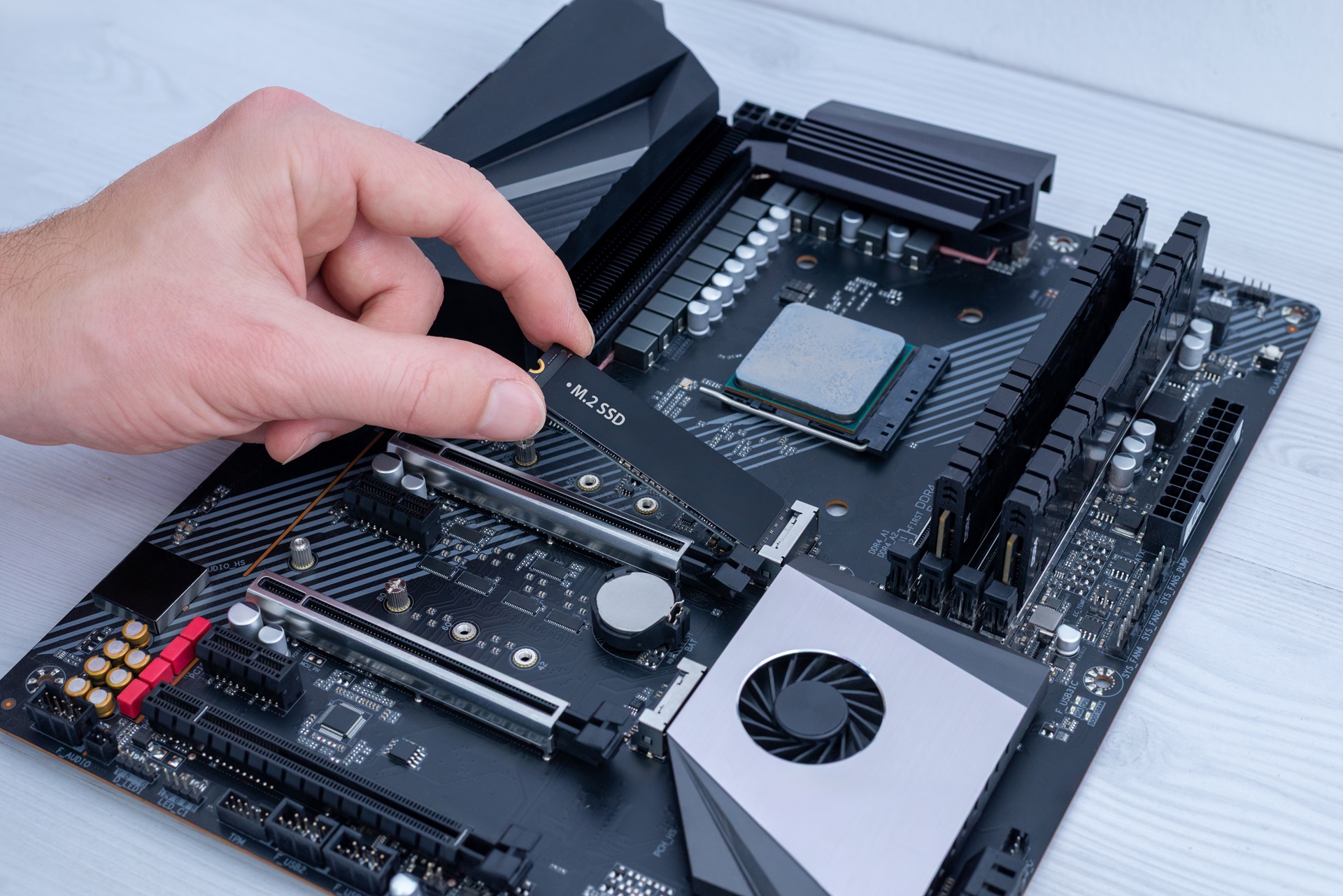
M.2 NVMe SSDs place the controller and NAND packages on a circuit board only 22 mm wide. Their compact dimensions make them suitable for desktops, laptops, and small-form-factor systems, but they also create a high component density.
A thin SSD heat spreader can:
The spreader may be installed directly by the SSD manufacturer or supplied as part of the motherboard.
A gaming SSD has to combine high transfer speed with a compact physical design. This combination makes thermal management a fundamental part of sustained performance.
The SSD controller manages communication between the host system and NAND flash. It processes read and write requests, error correction, address mapping, and other storage functions. During a demanding workload, the controller can become the hottest area on the drive.
Gaming can create several types of sustained storage activity:
A high peak speed does not guarantee that the SSD can maintain the same performance once heat builds up.
When the controller reaches its thermal threshold, the SSD may activate thermal throttling. The drive reduces its operating speed to lower heat output and remain within a safer temperature range.
Depending on the workload, thermal throttling may result in:
A heat spreader helps by distributing controller heat across more of the SSD’s surface. This can reduce the severity of the hotspot and allow heat to move more effectively into the surrounding air or motherboard cooling assembly.
Its thin profile is particularly valuable in gaming systems where clearance is restricted.
A large SSD heatsink may not fit:
A low-profile heat spreader addresses these limitations without fans, additional power or moving parts. It does not eliminate the need for good system airflow, but it gives the SSD a more effective first stage of thermal management.
For gaming storage, this means the thermal design should be evaluated alongside sequential speed, capacity and interface generation. An SSD must not only reach its advertised performance—it should also manage the heat generated while sustaining that performance.
 |
|
The Apacer AG2280Q4X M.2 PCIe Gen4 x4 SSD combines gaming performance with a low-profile thermal solution.
The drive is designed for PC gaming, AAA titles, fast game loading and high-capacity game storage. Its thermal architecture is particularly relevant for gaming laptops, compact desktop systems and motherboards where a conventional heavy SSD heatsink may not fit.
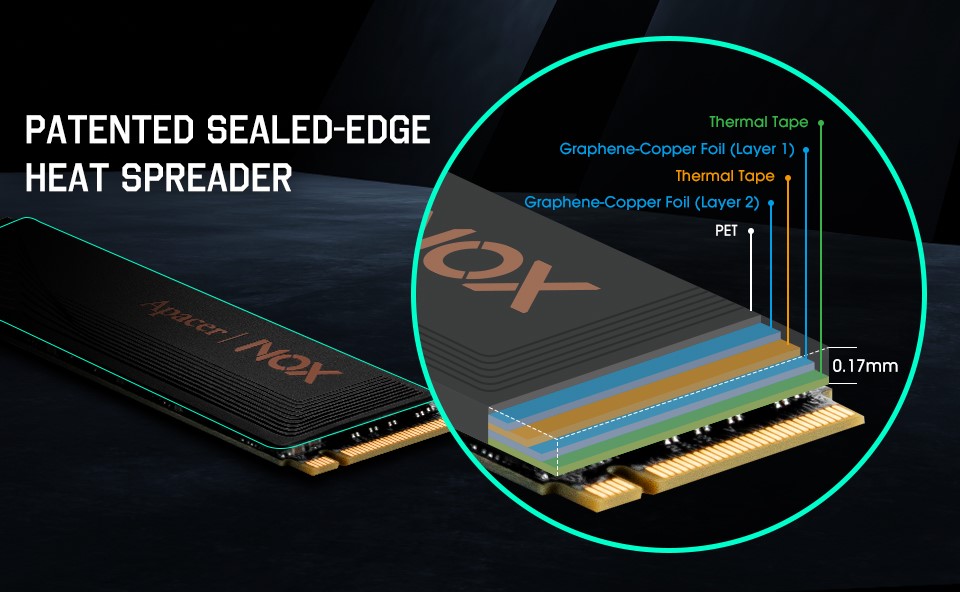
The AG2280Q4X features an advanced stacked graphene heat spreader designed to distribute heat across the SSD while maintaining a slim physical profile.
The layered structure provides a broader path for heat distribution around the controller and NAND components, helping manage localized hotspots without adding the bulk of a traditional heatsink.
The patented sealed-edge design helps protect the layered structure while supporting the durability and stability of the heat spreader.
The AG2280Q4X’s graphene heat spreader is designed to reduce operating temperature by up to 10%.
Lower operating temperatures can provide additional thermal headroom during sustained workloads, helping the SSD maintain more consistent performance. This is particularly relevant during long file transfers, game installations, updates, and other workloads that keep the SSD active continuously.
The thin spreader also avoids the bulk associated with traditional heavy heatsinks.
This provides several system-integration benefits:
The similar Apacer AS2280Q4X uses a graphene heat spreader that Apacer states can reduce operational temperature by 10%. That model also supports PCIe Gen4 x4, sequential read/write performance up to 5,000/4,400 MB/s and capacities up to 4TB.
The cooling result in an actual PC will still depend on workload, ambient temperature, motherboard layout and airflow. However, the integrated spreader provides thermal management directly at the drive level rather than relying entirely on external hardware.
The AG2280Q4X is designed for gaming workloads that require both fast storage access and substantial capacity.
Key specifications include:
The read performance supports fast access to game files, maps, textures and other large assets. The write performance is relevant when installing games, applying patches, recording gameplay or moving content between storage devices.
Capacity options up to 4TB provide space for:
Storage performance is only one factor in game loading. The processor, memory, game engine and software configuration also influence the final result. A PCIe Gen4 SSD can provide significantly higher storage bandwidth than traditional hard drives and lower-bandwidth interfaces, helping reduce storage-related delays.
The AG2280Q4X is therefore positioned for players who want a large game library on responsive NVMe storage without overlooking thermal behavior.
The low-profile thermal design makes the AG2280Q4X especially relevant for systems with limited internal clearance.
Its target applications include:
A compact PC creates a different thermal challenge from a full-size desktop.
Components are positioned closer together, airflow paths are shorter and heat from the CPU or GPU can raise the temperature around the SSD. At the same time, the system may not have enough physical space for a large finned cooling structure.
A thin graphene spreader distributes heat while preserving clearance for surrounding hardware. It can also work alongside a laptop cooling plate or motherboard M.2 shield when the system provides one.
Users should still verify M.2 compatibility and available clearance before installation. The location of screws, shields, thermal pads and other components differs between systems.
The central benefit of the AG2280Q4X’s thermal design is its ability to provide heat control where conventional bulky heatsinks are difficult or impossible to install.
Space-constrained gaming systems often have three simultaneous challenges:
The stacked graphene heat spreader addresses the first challenge by distributing heat away from the SSD controller. Its slim form factor addresses the third by fitting into spaces that may not accept a tall heatsink.
System airflow remains responsible for carrying the distributed heat out of the device, but the spreader gives that airflow a larger and more uniform thermal surface to work with.
During long gaming sessions, background downloads, large updates, or repeated asset loading, this thermal control can help the SSD remain below its throttling threshold for longer. The practical result is more consistent storage behavior without introducing fan noise, extra power cables, or major clearance restrictions.
For gamers choosing storage for a laptop, small-form-factor PC or crowded desktop motherboard, thermal design can be just as important as benchmark speed. The Apacer AG2280Q4X combines PCIe Gen4 performance, up to 4TB of storage, and advanced graphene heat-spreading technology in a compact M.2 2280 form factor—giving gamers a balance of speed, capacity, and thermal management.